- Qualcomm Snapdragon 801 quad-core processor at 2.5 GHz
- 3GB of RAM (both the S5 and One only have 2GB)
- 5.5 inch 1080p IPS Gorilla Glass 3 display
- 13 megapixel Sony camera with dual LED flash and 5 megapixel front facing camera
- Integrated stereo speakers
- 3,100 mAh battery
- Dimensions of 152.9 x 75.9 x 8.9 mm and 162 grams
Sometimes you just need to get to a file, access a program or just check up on something that you otherwise cannot do from your iPad. For most, remote computing starts out being an occasionally used feature on their iPad that slowly becomes more and more useful.

The following guide is intended for individuals that have a single desktop computer sitting at home that they personally use and wish to access from across the internet on their iPad.
Both Apple and Microsoft have built-in solutions for allowing remote access to the desktop. Apple uses a technology known as Virtual Network Computing (VNC) and can be configured from within the sharing preferences. Microsoft uses its own Remote Desktop Protocol (RDP) which is configured on the remote tab of the System Properties (just search for “remote” from the control panel).
Once configured you can use clients like VNC Viewer (Free, Universal) or Microsoft Remote Desktop (Free,Universal) on your iPad to connect to your desktop provided you are on the same local network.
Apple does have a service for iCloud users know as Back to my Mac that will locate and connect to your Mac from across the internet. The trouble is that this is only for Mac to Mac connections and in recent years it has proven to be very slow and less than reliable. Microsoft on the other hand does have a remote discovery service, but it requires you to set up and configure a Remote Desktop Gateway.
Google has recently shown off its own solution, which simplifies discovering desktops from across the internet and is known as Chrome Remote Desktop. While Google recently released an Android version of this Chrome app, it has not yet released an iOS version. Perhaps later this year.
Being able to quickly and easily locate and connect to your desktop from your iPad over the internet is the goal. Dealing with firewalls, port forwarding, and static ip addresses can be a real hassle for most users to configure manually. All of the apps in the following list have a host application that you need to install on your desktop. This application will automatically take care of making the connection between your iPad and your desktop over the internet. For the most part all you need to do is download, install, and log in to their remote service.
PocketCloud - Even though it’s an ad-based app, PocketCloud (Free, Universal) is the best free way to access your desktop computer from across the internet. What I liked most about PocketCloud was how its Touch Pointer made using a mouse on iPad’s touch screen a whole lot easier. It allows you to easily move the mouse around the screen by use of a big virtual mouse transparently displayed on the screen. You can access both the right and left click, as well as easily scroll documents up and down.
You will need to download the companion app for either PC or Mac in order to auto discover your desktop computer from across the internet. There is a Pro version of the app for $15 that not only removes the ads, but also allows you to add more than one computer to your remote discovery list. You can upgrade your free auto discovery account to a premium account for $24/yr which will allow you to access files, stream videos, and search your desktop more directly from within the app.
Source: www.gigaom.com
The following guide is intended for individuals that have a single desktop computer sitting at home that they personally use and wish to access from across the internet on their iPad.
Screen Sharing and Remote Desktop
Both Apple and Microsoft have built-in solutions for allowing remote access to the desktop. Apple uses a technology known as Virtual Network Computing (VNC) and can be configured from within the sharing preferences. Microsoft uses its own Remote Desktop Protocol (RDP) which is configured on the remote tab of the System Properties (just search for “remote” from the control panel).
Screen Sharing and Remote Desktop Settings
Once configured you can use clients like VNC Viewer (Free, Universal) or Microsoft Remote Desktop (Free,Universal) on your iPad to connect to your desktop provided you are on the same local network.
Discovery over the internet
Apple does have a service for iCloud users know as Back to my Mac that will locate and connect to your Mac from across the internet. The trouble is that this is only for Mac to Mac connections and in recent years it has proven to be very slow and less than reliable. Microsoft on the other hand does have a remote discovery service, but it requires you to set up and configure a Remote Desktop Gateway.
Google has recently shown off its own solution, which simplifies discovering desktops from across the internet and is known as Chrome Remote Desktop. While Google recently released an Android version of this Chrome app, it has not yet released an iOS version. Perhaps later this year.
Remote Discovery Host Applications
Being able to quickly and easily locate and connect to your desktop from your iPad over the internet is the goal. Dealing with firewalls, port forwarding, and static ip addresses can be a real hassle for most users to configure manually. All of the apps in the following list have a host application that you need to install on your desktop. This application will automatically take care of making the connection between your iPad and your desktop over the internet. For the most part all you need to do is download, install, and log in to their remote service.
iPad apps that connect remotely
PocketCloud - Even though it’s an ad-based app, PocketCloud (Free, Universal) is the best free way to access your desktop computer from across the internet. What I liked most about PocketCloud was how its Touch Pointer made using a mouse on iPad’s touch screen a whole lot easier. It allows you to easily move the mouse around the screen by use of a big virtual mouse transparently displayed on the screen. You can access both the right and left click, as well as easily scroll documents up and down.
You will need to download the companion app for either PC or Mac in order to auto discover your desktop computer from across the internet. There is a Pro version of the app for $15 that not only removes the ads, but also allows you to add more than one computer to your remote discovery list. You can upgrade your free auto discovery account to a premium account for $24/yr which will allow you to access files, stream videos, and search your desktop more directly from within the app.
Source: www.gigaom.com

Gameloft, a leading global publisher of digital and social games, and MediaTek, a leading fabless semi-conductor company specializing in wireless communications and digital multimedia solutions, announce that the highly anticipated Modern Combat 5 will be optimized on the new MT6592 octa-core smartphone chip, for Android smartphones.
The MT6592, MediaTek’s latest innovation, is the first true octa-core processor in the world, and Gameloft’s next title, Modern Combat 5, will be the first game optimized for the new chip. As mobile gaming moves toward highly detailed and realistic gameplay, the need for a higher performance chipset is required. Specific features of the new Modern Combat 5 include definition levels not seen before, especially in the technically difficult mediums of water distortion effects, reflections and shadowing.
Modern Combat 5 is a fast-moving, visually exciting action game played across various terrains and conditions. MT6592 allows for continuous scrolling in high definition with attention to detail from soft particle display to enhanced depth of field to create a more immersive experience.
“We’re thrilled to continue our collaboration with MediaTek,” said Ludovic Blondel, Vice President OEM at Gameloft. “This new octa-core system on a chip is focused on high performance and is one of the best mobile technologies on today’s market. We are delighted to showcase this innovative, high-end technology in Modern Combat 5, one of our most awaited games of 2014.”
“With the rapid development of mobile Internet applications and services, mobile gaming has become one of the leading value-added services for our customers and the best medium to experience the power of True Octa-Core with our MT6592 chip,” said Jeffrey Ju, General Manager of MediaTek Smartphone Business Unit. “Our partnership with Gameloft on Modern Combat 5 is a major breakthrough for the industry and gaming community, as we empower the ultimate gaming experience that can be enjoyed anywhere, anytime.”
Modern Combat 5 will be available on all smartphone models equipped with the MT6592 chip, and will be available for download from the Google Play Store in early 2014.
Could it be that Bose is trying to get hipper in its old age? That's what it seems like if you examine its latest announcement, which boils down to putting a fresh, more modern face with bolder colors on some of its current models.

According to a Bose PR rep, the new SoundTrue around-ear and on-ear headphones replace the AE2 and OE2 products in the Bose headphone line, while the new FreeStyle earbuds ($129.95), which come in Indigo/Ice Blue complement the existing IE2, MIE2 & MIE2i in-ear headphones but don't replace them.
The on-ear and around-the-ear SoundTrue models, which both cost $179.95, will come in black and white, as well some "two-tone" designs -- purple/mint (on-ear headphones only) and black/mint (around-ear headphones only).
The same PR confirmed that the changes are cosmetic and that the new models' sound is in line with that of the older models. They will also all feature in-line remotes with a microphone.
"The audio performance is comparable to our AE2, OE2, and IE2 headphones," the rep said. "There are no notable improvements."
All these headphones are among the most comfortable in their categories. Their sound is good, too, though you can find competing models that deliver even better sound for the money. (Picking the right headphone always involves balancing comfort with sound quality.)
The new models are shipping now, and we'll give them a whirl in the near future to confirm that they really do sound the same.
Source: www.cnet.com
According to a Bose PR rep, the new SoundTrue around-ear and on-ear headphones replace the AE2 and OE2 products in the Bose headphone line, while the new FreeStyle earbuds ($129.95), which come in Indigo/Ice Blue complement the existing IE2, MIE2 & MIE2i in-ear headphones but don't replace them.
The on-ear and around-the-ear SoundTrue models, which both cost $179.95, will come in black and white, as well some "two-tone" designs -- purple/mint (on-ear headphones only) and black/mint (around-ear headphones only).
The same PR confirmed that the changes are cosmetic and that the new models' sound is in line with that of the older models. They will also all feature in-line remotes with a microphone.
"The audio performance is comparable to our AE2, OE2, and IE2 headphones," the rep said. "There are no notable improvements."
All these headphones are among the most comfortable in their categories. Their sound is good, too, though you can find competing models that deliver even better sound for the money. (Picking the right headphone always involves balancing comfort with sound quality.)
The new models are shipping now, and we'll give them a whirl in the near future to confirm that they really do sound the same.
Source: www.cnet.com

Acer Aspire S7 Notebook Review, Specs: Acer is hitting the homerun with the new $1,499 Acer Aspire S7-392-6411 Ultrabook. The second generation of the company's S7 series guarantees some updates, such as improved battery life, a better keyboard and a fourth-generation Intel Core i5 processor. But the Aspire hasn't discarded the aspects of the S7 we loved, namely the super-slim, all-white chassis and the 1080p touch-screen that continues to turn heads according to Laptop Magazine.
According to reviews, Acer can definitely make a pretty laptop. The lid of the S7 is an absolute vision in white, all-aluminum, unibody chassis, covered in Corning Gorilla Glass 2 with the silver border that lines the lid as well as the light-up Acer logo in the center.
The lid is about a millimetre shorter than the deck that makes opening the notebook a bit difficult. When closed, the lid shows off the sturdy, rounded, silver hinge that enables the display to tilt back a full 180°.
The keyboard deck has its matte silver silky feel. The sides of the deck are curve upward at a gentle angle and how the keyboard resides in a subtle recess.
The power button is hidden along the left side of the laptop toward the hinge which according to Laptop Mag could have been better if on plenty of space on the deck.
The following is Laptop Magazine's comprehensive review of the Aspire S7 Notebook:
Display: The Aspire S7's 13.3-inch, 1080p display vivid colors particularly blues, greens and yellows. Viewing angles were broad that will allow viewers to move past 45 degrees in either direction.
This notebook's screen measured a bright 329 lux on our light meter, beating the 236-lux ultraportable average. The S7 also outshone the ATIV Book 9, the Air and the Pro 13, which scored 284, 263 and 237 lux, respectively, says Laptop Mag.
Audio: Acer Aspire S7's pair of speakers is on the bottom of the notebook. Making muffled audio that barely fills a small room that will serve for a small audience. The Dolby Home Theater v4 software did little to alleviate the hollowness on music. The keyboard was clear, as were the vocals, but the bass was virtually nonexistent.
Acer has also included its Purified.Voice technology, which the company claims will eliminate background noise and volume reduction during video chats and VoIP calls. During the magazine's test Skype call, the caller reported loud and clear audio when reviewers are in the general proximity of the Ultrabook. When they began to move around the room, however, the caller said their voice became distant. He could also hear the keystrokes as they typed.
Keyboard and Touchpad: The Aspire S7's gray, island-style keyboard has relatively well-spaced keys with electroluminescent backlighting, it's easy to keep typing in dim situations. Better yet, the lighting automatically adjusts depending on the ambient light levels. The Tilde button is much larger than the Caps Lock key, and the Left Tab button is undersized. There's also more than enough room for a row of function keys -- no need to double them up with the number keys.
Performance: For such a svelte laptop, the Acer Aspire S7-392 packs quite a wallop. Its 1.6-GHz fourth-generation Intel Core i5-4200 CPU with 8GB of RAM ably streamed an episode of "Breaking Bad" from Netflix while performing a system scan with 8 open tabs in Google Chrome, Firefox and IE.
Configurations: Our $1,499 configuration of the Acer Aspire S7-392 features a 1.6-GHz Intel Core i5-4200 CPU with 8GB of RAM, a 128GB SSD and an Intel HD Graphics 4400 GPU with 128MB of VRAM. The $1,699 model (S7-392-9890) has a 1.8-GHz Intel Core i7-4500U processor, 8GB of RAM, a 256GB SSD and an Intel HD Graphics 4400 GPU with 128MB of VRAM.
The 4.2 x 2.4-inch Synaptic touchpad is both spacious and responsive, a great improvement over the original S7. Performing Windows 8 gestures, such as summoning the Charms menu and switching apps, was a fluid experience. Two-finger scroll and rotate were also smooth and reliable.
After 15 minutes of streaming a full-screen Hulu video on the S7, the notebook's touchpad measured a cool 79 degrees Fahrenheit. The space between the G and H keys and the S7's undercarriage were slightly warmer, at 84 and 85 degrees, respectively. All of these measurements are below our comfort threshold of 95 degrees. Nevertheless, the previous S7 registered a cooler 75, 80 & 80° in the same locations.
On the PCMark 7 benchmark, the S7 notched 5,051, well above the 3,800 ultraportable averages. The Sony VAIO Pro 13 and its 1.8-GHz Intel Core i7-4500U CPU scored 4,698. The Samsung ATIV Book 9's 2-GHz Intel Core i7-3537U processor posted 4,490.
During Geekbench, the S7 notched 5,184, failing to meet the 6,082 average. However, the S7's score placed it only slightly behind the ATIV Book 9's showing of 5,187. The Pro 13 did somewhat better, with 5,507, while the MacBook Air and its 1.7-GHz Intel Core i7-4650U processor scored 8,333.
The Acer Aspire S7-392-6411 comes with a one-year limited warranty.
Source: www.kdramastars.com
Lytro’s first offering was meant to bedazzle hipsters. The hand-held point and shoot light-field camera let photographers refocus shots after taking them. It was (and is) very cool, but it wasn’t exactly up to professional standards. With a new camera called the Illum, a DSLR-style shooter with an 8X optical zoom and a high-speed, sports-worthy shutter, Lytro hopes to tap into the creative professional market.
Lytro more or less invented the market for light-field cameras in 2011. Prior to its first release, they had largely been limited to labs. Light-field cameras use a lens array to capture not just an image itself, but also the bundles of light rays, and the direction they are moving in a particular scene. Despite rave reviews, it hasn’t ever really taken off. It will be available in July for $1,500.

With the Illum, Lytro is targeting a more specialized market. In addition to the 8X (30 – 250mm) zoom lens, it has a constant f/2.0 aperture, 1/4000 shutter, and a four-inch backside touchscreen display. According to the company, the new sensor can capture 40 million light rays (Lytro doesn’t list megapixels) to the original’s 11 million. Its desktop processing software works with traditional products, like Adobe’s Photoshop and Lightroom. Photographers can use the camera’s software to refocus pictures after the fact, generate 3-D images, adjust the depth of field, and create tilt shifts.
Beyond its lens and bigger sensor, there are other ways the Illum surpasses Lytro’s original model. For example, because it’s such a different concept than most photographers are accustomed to, the camera has built-in software that color codes the display with depth information. It effectively previews the depth range you’ll have to work with once you shoot a photo.
This, Lytro says, is to help photographers start to think in three dimensions. Afterwards, photographers can export the images to traditional formats, or thanks to WebGL, publish them online in ways that let people interact with them and manipulate them later.
There are also just a ton of little features on this camera that are really solid. Lytro says the angled touchscreen is designed for photography where you’re less likely to be holding a camera directly up in front of your face. The lens itself is super light–as is the entire camera–but it feels rugged and solid with great knurling and smooth focus and zoom adjustments; on par with high-end DSLRs.
Other aspects of the camera are simply mind-boggling. Although we’re getting used to the ability to refocus and adjust depth of field after the fact–the new HTC One does a good job of it, for example–nothing else has this camera’s incredible range for doing so. Likewise, shooting something with a single-lens camera, and then seeing it on screen in rich 3-D is pretty amazing. Perhaps the most amazing out-of-the-box feature, however, is its ability to take insane macro shots. Objects held nearly flush with the lens appeared perfectly in focus–and yet still let you refocus on other objects across the room.
Right now, Lytro is appealing to people trying to stand out in a world of flat, static photos. But clearly, the company is moving toward a future wherein light-field photography, video, 3-D, and virtual reality will all be converging. The Illum is certainly pointing the way there.
Source: www.wired.com
Lytro more or less invented the market for light-field cameras in 2011. Prior to its first release, they had largely been limited to labs. Light-field cameras use a lens array to capture not just an image itself, but also the bundles of light rays, and the direction they are moving in a particular scene. Despite rave reviews, it hasn’t ever really taken off. It will be available in July for $1,500.
With the Illum, Lytro is targeting a more specialized market. In addition to the 8X (30 – 250mm) zoom lens, it has a constant f/2.0 aperture, 1/4000 shutter, and a four-inch backside touchscreen display. According to the company, the new sensor can capture 40 million light rays (Lytro doesn’t list megapixels) to the original’s 11 million. Its desktop processing software works with traditional products, like Adobe’s Photoshop and Lightroom. Photographers can use the camera’s software to refocus pictures after the fact, generate 3-D images, adjust the depth of field, and create tilt shifts.
Beyond its lens and bigger sensor, there are other ways the Illum surpasses Lytro’s original model. For example, because it’s such a different concept than most photographers are accustomed to, the camera has built-in software that color codes the display with depth information. It effectively previews the depth range you’ll have to work with once you shoot a photo.
This, Lytro says, is to help photographers start to think in three dimensions. Afterwards, photographers can export the images to traditional formats, or thanks to WebGL, publish them online in ways that let people interact with them and manipulate them later.
There are also just a ton of little features on this camera that are really solid. Lytro says the angled touchscreen is designed for photography where you’re less likely to be holding a camera directly up in front of your face. The lens itself is super light–as is the entire camera–but it feels rugged and solid with great knurling and smooth focus and zoom adjustments; on par with high-end DSLRs.
Other aspects of the camera are simply mind-boggling. Although we’re getting used to the ability to refocus and adjust depth of field after the fact–the new HTC One does a good job of it, for example–nothing else has this camera’s incredible range for doing so. Likewise, shooting something with a single-lens camera, and then seeing it on screen in rich 3-D is pretty amazing. Perhaps the most amazing out-of-the-box feature, however, is its ability to take insane macro shots. Objects held nearly flush with the lens appeared perfectly in focus–and yet still let you refocus on other objects across the room.
Right now, Lytro is appealing to people trying to stand out in a world of flat, static photos. But clearly, the company is moving toward a future wherein light-field photography, video, 3-D, and virtual reality will all be converging. The Illum is certainly pointing the way there.
Source: www.wired.com

The world’s biggest technology manufacturer said that Youm, the brand it has used for its flexible display technology since June, was a prototype that was not going to launch imminently. Samsung's continued emphasis on the technology will worry its rivals, however, and indicates that the Korean company is continuing both to work on new display technologies and to reduce its reliance on Google Android. It pointedly demonstrated the phone running Windows Phone 8.
The true impact of flexible displays, however, is likely to be hampered by the size and rigidity of vital processing and memory technology. The demonstration unit featured a flexible display attached to a small processing box.
Analysts say the first uses for flexible displays are most likely to be in devices that are more durable than glass because they can absorb force rather than crack under it. The new technology is also likely to be used, Samsung said, to wrap displays around devices and allow them, for instance, to show information on their edges.
Eric Rutter, Microsoft’s Chief Technology Strategy Officer, said that it was clear that displays did not need to be rigid. On stage at the Consumer Electronics Show in Las Vegas, the prototype phone was shown being flexed and bent without any conspicuous colour distortion, with other pre-recorded demonstrations shown on film. Referring to people who have talked about Apple's marketing creating a "reality distortion field," he claimed "we've actually built one".
Corning, the maker of Gorilla Glass, which is widely used across mobile phones, is also working on a flexible glass product called Willow. It is likely to be available in time for use on devices such as the Samsung Galaxy S4 and the forthcoming iPhone, but will not offer the flexibility of plastic. Subsequent mobile phone releases, therefore, may not use as much glass and may instead move to flexible displays.
Samsung has been working on flexible displays for a number of years, but its latest demonstration was the first to prove it has already talked to other companies about how it might implement flexible displays. Previous rumours have, however, suggested that it has also spoken to Google about a version of Android for such devices.
Samsung’s keynote also featured former American President Bill Clinton. He reiterated his observations on the transformative power of technology for the developing world, and also said he had seen how much medical technology had moved on during his wife Hillary Clinton’s recent hospital stay. He also added his voice to calls for stricter gun control in America.
Source: Telegraph

Google is working on smart contact lenses, and two patents secured last week suggest the company is taking the idea seriously. The company is working on contacts with embedded cameras, as well as lenses aimed at diabetics who need to constantly monitor their blood sugar levels.
In the latter application, an embedded “ophthalmic electrochemical sensor” would test the wearer’s tear fluid and alert him or her to any drops in blood sugar levels. The lens would include a working electrode and a much larger reference electrode. An antenna would also be included—all on the convex and concave surfaces of the contact lens.
“We’re testing prototypes that can generate a reading once per second,” Google’s Brian Otis and Babak Parviz wrote, when announcing the project. “We’re also investigating the potential for this to serve as an early warning for the wearer, so we’re exploring integrating tiny L.E.D. lights that could light up to indicate that glucose levels have crossed above or below certain thresholds. It’s still early days for this technology, but we’ve completed multiple clinical research studies which are helping to refine our prototype. We hope this could someday lead to a new way for people with diabetes to manage their disease.”
The company is in discussions with the F.D.A., which would obviously need to approve the lenses before they can more to market.
Google’s foray into medical devices offers an interesting backdrop against which we can examine the tech giant’s controversial Google Glass product line. Earlier this week, The Atlantic published another look at Glass, wherein blind writer Will Butler posited that “our fear of assistive technology” is to blame for the frosty reception Glass has received. (A number of Glass wearers have been mugged, and the product has not been polling well with consumers.)
“There remains a disheartening chasm between what we think of as assistive tech versus good design. Glass is struggling because it hovers between the two,” Butler wrote, arguing that Glass wearers are seen as weak.
Even Google’s vision of contact lenses with cameras have some assistive applications: the patent filing for that product notes that the lenses could be used to alert blind wearers to approaching cars, for example, by taking an image and transferring the information into sound. It’s hard to imagine the public taking issue with such medical uses (thankfully, no one is protesting outside of the Boston area hospital where Google Glass helped a physician save a man’s life), but in a world where anyone wearing Google Glass is liable to be called a “Glasshole,” it’s not at all difficult to imagine the uproar over proposed features like built-in zoom capability for those who don’t have issues seeing.
Source: www.vanityfair.com

Making a multiplayer-focused game is always a big challenge for indie developers starting out, particularly for their first game.
That’s not to say it hasn’t been done of course, the leading example being Facepunch’s hit Steam Early Access game Rust. But the road is paved with many that have fallen before it.
New UK developer Freejam has taken on the challenge however, and what’s more, they’ve gone free-to-play. The game is called Robocraft, currently in a playable alpha, which its creators describes as the illegitimate child of Minecraft and World of Tanks.
The team consists of ex-Climax veterans and includes Mark Simmons, Sebastiano Mandalà, Edward Fowler, Brian O’Connor and Richard Turner. Game director Simmons tells Develop despite working on IP for the likes of Square Enix, Microsoft, Sony and Konami, the developers wanted to work on their own creation, a story increasingly familiar in the game industry.
“Working on major well known IP’s is one thing, but when they aren’t ‘your’ IP’s then you don’t get the full feeling of satisfaction when the user enjoys your game. That’s what we wanted,” he says.
Their debut title, Robocraft, is designed as a team-based eSport game that allows users to build their own tanks by piecing together blocks and verious tank parts.
"I know what you’re thinking 'oh no, not another minecraft clone', but we’re different,” says Simmons.
“We set about creating a credible team based eSport about the idea of building high fidelity battle machines from cubes. The cubes form the chassis, and then the user adds components such as wheels, jet thrusters, hoverblades, laser cannons, etcetera."
When I ask why the focus on user generated content for such a title, Simons says: “It really started out as the answer to a question: How can our little team of five developers deliver an epic team based MMO eSport without being able to produce tons of content?”
The free-to-play venture has worked out well for the team so far, attracting 300,000 users during the last three months, with 20,000 users playing each day and 2,500 joining on average every day.
Simmons says the developer was able to achieve this in part thanks to well known YouTubers in countries such as Poland sparking increased interest in the title, once again highlighting the importance of user videos and allowing players to create their own Let’s Play content – and letting them make money from your IP.
But being an indie, how do you attract enough players for a multiplayer game to ensure users will always find someone to play against while also keeping them engaged for the long-term? Simmons argues that’s why the team went free-to-play, but admits the problem was still tricky to tackle early on.
"If you’re free then you’re likely to attract more users, even if they aren’t paying.,” he explains.
It has come with it’s own issues though. Servers cost money, and if your users aren’t paying, then getting more users actually costs you more money. Luckily our user payments are covering the cost of the servers now so we haven’t got this worry anymore.
Of another solution to the issue of ensuring there are enough players, Simmons adds: “When we initially released getting enough users was a major problem. To fix it we had to release a ‘countdown timer’. The counter counted down from three minutes and every time the counter got to zero we launched a battle.
“This way, although there were not many users online they all went into battle at the same time, which ensured we had enough users to fight each other. We switched over to a ‘battle-whenever-you-want’ system when the user numbers were high enough."
Much like Wargaming claims World of Tanks is free-to-play and not “pay-to-win”, FreeJam also claims their title is playable “without spending a penny”. He admits that players can accelerate through the game by purchasing a premium membership, and users can also purchase cubs and components, but the latter is only available to those that have earned points through gameplay.
“Users can purchase cubes and components directly but only when they have unlocked the license for that component using Tech Points - which you have to play to earn,” he explains.
“There is no way to just put $100 down and get a fantastic Robot right away, even paying users must fight to progress. Users can also purchase a few items which are real money only, but they are cosmetic only, there are no pay for only items that can get you a competitive advantage. We’re really trying to play the F2P thing in an ‘indie way’, i.e. fair and not aggressively.”
Robocraft is currently in alpha phase, and the developers plan to take the title onto Steam Early Access having successfully gone through Steam Greenlight in just five days.
Source: www.develop-online.net
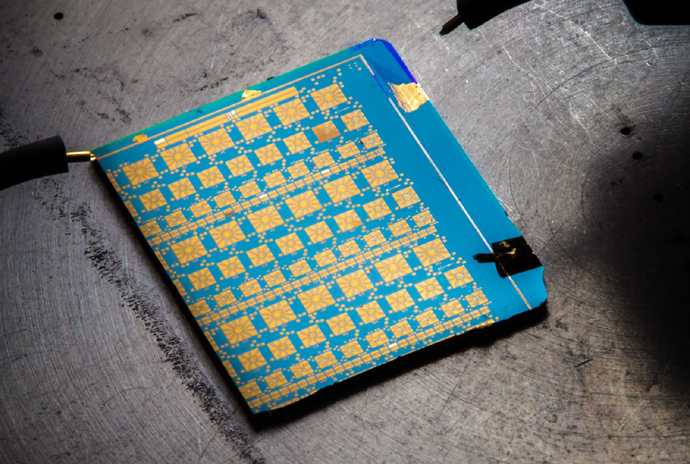
The antennas in most of today's smartphones do not function efficiently in 3G and 4G/LTE wireless environments. This leads to slower download speeds, reduced voice quality, lower energy efficiency and more dropped calls. A technology commonly used in satellite and defense applications-RF MEMS or Radio Frequency Micro-Electro-Mechanical Systems-is now poised to improve smartphone performance in the near future by way of higher antenna efficiency.
"If you can make smartphone antennas 2 or 3 dB more efficient, you basically halve your download times. Truly, if we accomplish this with RF MEMS technologies, it's a huge deal," said electrical engineering professor Gabriel Rebeiz. His labs have accomplished many fundamental RF MEMS research breakthroughs, created proof-of-concept applications, and led key technology transfer efforts. This work has advanced RF MEMS to the point where large-scale incorporation into smartphone antennas appears probable if not inevitable.
"We demonstrated that you can get a better antenna, a better filter, a better power amplifier using RF MEMS. These were the first demonstrations. Industry took this work and adapted it to their own situations," said Rebeiz. He was awarded the 2014 IEEE Daniel E. Noble Award for Emerging Technologies "for pioneering contributions enabling commercialization of RF MEMS technology and tunable micro- and millimeter-wave systems."
A 2012 article in MEMS Journal predicted that the RF MEMS market would expand by a factor of 200 to $150 million by 2015, driven by implementation in handsets and tablets.
In addition to antennas, RF MEMS technology could find its way into tunable filters for smartphone radios that might one day replace the tens of individual filters built into today's smartphones. With the rise of carrier aggregation-which is the use of multiple frequency channels to divide data, such as a video, that is being sent or downloaded in today's advanced wireless networks-filters are increasingly important, explained Bilgehan Avser, an electrical engineering graduate student in the Rebeiz lab.
"Metal-contact and capacitive switches could turn out to be extremely important for tunable RF front ends of next-generation communication systems," said Avser.
Cellphone base stations could also see RF MEMS implementations. But applications beyond tunable antennas could take more time to be implemented in commercial handsets and tablets, Rebeiz noted.
In recent years, antenna size-and by extension radio frequency performance-has lost ground in phones to larger screens and thinner form factors that exclude larger antennas. At the same time, the demands placed on these antennas have increased. For example, even though antennas have gotten smaller, they are being asked to cover low-frequency bands that would require larger antenna form factors.
"The smartphone antenna, which has long been neglected, now is of prime importance for how to make the smartphone more efficient," said Rebeiz. Incorporating RF MEMS into smartphone antennas yields "tunable" antennas that work efficiently across one or two frequency bands at a time. The frequency at which they function most efficiently, however, can be changed-and RF MEMS metal-contact switches and variable capacitors are used to make the antennas tunable.
"With RF MEMS, you can take an inefficient wideband antenna and turn it into an efficient tuned antenna," said Rebeiz. In this context, RF MEMS serves as a low-loss switched variable capacitor capable of changing the antenna's resonant frequency, which is the frequency at which the antenna operates most efficiently.
Rebeiz has been a leader in RF MEMS research for more than a decade. Much of the early research focused on defense and satellite communication applications such as phased-array systems with sophisticated "beam steering" antennas. In this arena, RF MEMS technologies enable the electronic steering of multiple antennas that function together in order to steer signals to a precise location and ensure the signal does not interfere with other systems. Another application: rugged hand-held radios that work efficiently at many different wireless frequencies.
His research group's contributions include making MEMS robust in the face of process stresses incurred during micro-fabrication, as well as temperature extremes. They also helped demonstrate the vast potential that RF MEMS hold for commercial applications.
In September 2006, Rebeiz became the founding director of the UCSD/DARPA Center on RF MEMS Reliability and Design Fundamentals. As the leader of this eight-year collaboration between universities, the U.S. Federal Government and industry, Rebeiz works to ensure that knowledge on RF MEMS advances are widely available in order to further spur innovation.
Many of the graduate students who worked on RF MEMS projects while at UC San Diego are now working on related challenges in industry-at companies like Cavendish Kinetics and WiSpry that are commercializing RF MEMS technologies, and at companies such as Apple, Qualcomm, Intel and Samsung that are looking to incorporate RF MEMS and other tunable technologies into their products.
A dual-band frequency tunable antenna for carrier aggregation systems. Varactor diodes (black cube above) tune the antenna's frequency. RF MEMS capacitive switches to replace the varactor diodes and improve antenna performance are being developed in the Rebeiz lab.
Source: UCSD Jacobs | School of Engineering
"If you can make smartphone antennas 2 or 3 dB more efficient, you basically halve your download times. Truly, if we accomplish this with RF MEMS technologies, it's a huge deal," said electrical engineering professor Gabriel Rebeiz. His labs have accomplished many fundamental RF MEMS research breakthroughs, created proof-of-concept applications, and led key technology transfer efforts. This work has advanced RF MEMS to the point where large-scale incorporation into smartphone antennas appears probable if not inevitable.
"We demonstrated that you can get a better antenna, a better filter, a better power amplifier using RF MEMS. These were the first demonstrations. Industry took this work and adapted it to their own situations," said Rebeiz. He was awarded the 2014 IEEE Daniel E. Noble Award for Emerging Technologies "for pioneering contributions enabling commercialization of RF MEMS technology and tunable micro- and millimeter-wave systems."
A 2012 article in MEMS Journal predicted that the RF MEMS market would expand by a factor of 200 to $150 million by 2015, driven by implementation in handsets and tablets.
In addition to antennas, RF MEMS technology could find its way into tunable filters for smartphone radios that might one day replace the tens of individual filters built into today's smartphones. With the rise of carrier aggregation-which is the use of multiple frequency channels to divide data, such as a video, that is being sent or downloaded in today's advanced wireless networks-filters are increasingly important, explained Bilgehan Avser, an electrical engineering graduate student in the Rebeiz lab.
"Metal-contact and capacitive switches could turn out to be extremely important for tunable RF front ends of next-generation communication systems," said Avser.
Cellphone base stations could also see RF MEMS implementations. But applications beyond tunable antennas could take more time to be implemented in commercial handsets and tablets, Rebeiz noted.
In recent years, antenna size-and by extension radio frequency performance-has lost ground in phones to larger screens and thinner form factors that exclude larger antennas. At the same time, the demands placed on these antennas have increased. For example, even though antennas have gotten smaller, they are being asked to cover low-frequency bands that would require larger antenna form factors.
"The smartphone antenna, which has long been neglected, now is of prime importance for how to make the smartphone more efficient," said Rebeiz. Incorporating RF MEMS into smartphone antennas yields "tunable" antennas that work efficiently across one or two frequency bands at a time. The frequency at which they function most efficiently, however, can be changed-and RF MEMS metal-contact switches and variable capacitors are used to make the antennas tunable.
"With RF MEMS, you can take an inefficient wideband antenna and turn it into an efficient tuned antenna," said Rebeiz. In this context, RF MEMS serves as a low-loss switched variable capacitor capable of changing the antenna's resonant frequency, which is the frequency at which the antenna operates most efficiently.
Rebeiz has been a leader in RF MEMS research for more than a decade. Much of the early research focused on defense and satellite communication applications such as phased-array systems with sophisticated "beam steering" antennas. In this arena, RF MEMS technologies enable the electronic steering of multiple antennas that function together in order to steer signals to a precise location and ensure the signal does not interfere with other systems. Another application: rugged hand-held radios that work efficiently at many different wireless frequencies.
"We laid out the fundamental work to make RF MEMS a reality, through investigation of so many fundamental problems of MEMS. We solved a lot of these problems and transferred the advances to industry," said Rebeiz.
His research group's contributions include making MEMS robust in the face of process stresses incurred during micro-fabrication, as well as temperature extremes. They also helped demonstrate the vast potential that RF MEMS hold for commercial applications.
In September 2006, Rebeiz became the founding director of the UCSD/DARPA Center on RF MEMS Reliability and Design Fundamentals. As the leader of this eight-year collaboration between universities, the U.S. Federal Government and industry, Rebeiz works to ensure that knowledge on RF MEMS advances are widely available in order to further spur innovation.
Many of the graduate students who worked on RF MEMS projects while at UC San Diego are now working on related challenges in industry-at companies like Cavendish Kinetics and WiSpry that are commercializing RF MEMS technologies, and at companies such as Apple, Qualcomm, Intel and Samsung that are looking to incorporate RF MEMS and other tunable technologies into their products.
"Our RF MEMS work has been a good ride. It has been exactly what I feel research should be. You take a problem. You spend 12 to 14 years on it. You solve its fundamental issues. You transfer it to industry," said Rebeiz. "Have we solved all of the problems? No. But we have gone from 10 percent of understanding of RF MEMS to 90 percent."
A dual-band frequency tunable antenna for carrier aggregation systems. Varactor diodes (black cube above) tune the antenna's frequency. RF MEMS capacitive switches to replace the varactor diodes and improve antenna performance are being developed in the Rebeiz lab.
Source: UCSD Jacobs | School of Engineering
Google Inc. is partnering with solar panel maker SunPower Corp. to invest up to $250 million in leasing solar systems to homeowners. The Mountain View technology giant is contributing up to $100 million, and San Jose-based SunPower will invest $150 million, Google said in a blog post. The goal is to make "it easier for thousands of households across the U.S. to go solar."

Google's plans come at a time when new financing methods are driving a boom in the residential solar market. More homeowners now lease panels from solar companies than buy them outright.
Renewable energy companies are also finding creative ways to finance their businesses. Solar developers who work with homeowners often have a difficult time convincing traditional banks to fund anything smaller than large-scale projects, analysts said. Many investment firms are unsure of the risks associated with solar and unwilling to wait out the payout period, which can last decades.
Google has shown a keen interest in investing in green energy projects in recent years. It has previously invested in solar leasing programs through SolarCity/Clean Power Finance. In November, the company said it planned to pony up $80 million for six utility-scale solar facilities in California and Arizona.
Source: Los Angeles Times
Google's plans come at a time when new financing methods are driving a boom in the residential solar market. More homeowners now lease panels from solar companies than buy them outright.
"Using the fund ... we buy the solar panel systems," Google said. "Then we lease them to homeowners at a cost that's typically lower than their normal electricity bill."
Renewable energy companies are also finding creative ways to finance their businesses. Solar developers who work with homeowners often have a difficult time convincing traditional banks to fund anything smaller than large-scale projects, analysts said. Many investment firms are unsure of the risks associated with solar and unwilling to wait out the payout period, which can last decades.
Google has shown a keen interest in investing in green energy projects in recent years. It has previously invested in solar leasing programs through SolarCity/Clean Power Finance. In November, the company said it planned to pony up $80 million for six utility-scale solar facilities in California and Arizona.
Source: Los Angeles Times
Lorem ipsum dolor sit amet, consectetur adipiscing elit. Nulla luctus cursus magna id placerat. Nulla et lectus eget metus eleifend vulputate. Nullam ligula velit, porttitor eu velit eu, adipiscing tempus arcu. Vestibulum lobortis ligula eget ante lacinia viverra. Nulla dapibus arcu et erat adipiscing aliquet. Maecenas accumsan aliquet turpis. Etiam luctus ligula eget gravida ultricies. Ut nec orci ac mauris rutrum sollicitudin. Nam eleifend dictum elit ac rutrum. Sed vitae placerat mauris. In hac habitasse platea dictumst. Mauris auctor, eros vitae accumsan gravida, velit mi eleifend diam, eget auctor diam tortor ac metus.
Sed at diam sit amet est tempor auctor. Sed nec tincidunt diam. Donec ut metus in turpis pharetra tincidunt. Morbi dapibus sodales nibh ultrices porta. Maecenas quis est nec est suscipit blandit. Curabitur diam est, rutrum sed interdum id, mattis tempus nunc. Sed risus nisi, dignissim et dui a, tincidunt sodales tellus. Quisque at neque lectus. Curabitur bibendum eros quis dui porta viverra. Sed facilisis nulla eu tempus vulputate. Maecenas eu leo lorem. Etiam massa libero, faucibus ut nulla nec, suscipit ultrices augue. Integer blandit volutpat arcu eu mollis.

Nam vestibulum lorem nisi, nec interdum ante tempus eget. Curabitur tincidunt, mauris a dapibus scelerisque, nisl turpis ultricies nisl, id molestie justo metus vel sapien. Nulla commodo enim erat, fringilla convallis massa pharetra tincidunt. Duis tristique tortor nec auctor malesuada. Donec sollicitudin fermentum nunc vel sagittis. Etiam id purus nisl. Vivamus id neque id sapien suscipit ultricies sit amet sed lacus. Maecenas interdum condimentum eros at molestie. Etiam tincidunt at purus nec tincidunt. In semper augue dui, non aliquet sapien congue id. Suspendisse potenti. Nulla facilisi.
Sed porttitor tortor at accumsan tempor. In sit amet mauris id est egestas malesuada eu vel nibh. Vivamus et est nisl. Pellentesque auctor vehicula cursus. Mauris feugiat nulla a erat porta adipiscing. In hac habitasse platea dictumst. Ut pretium ante vel velit fermentum elementum. Quisque eu purus massa. Phasellus mollis cursus dui a hendrerit. Donec varius sapien vitae libero faucibus ullamcorper. Pellentesque quis est sit amet purus blandit varius ac eget felis. Praesent augue enim, accumsan ut magna quis, varius mollis metus. Nullam laoreet magna est, non lacinia sem lobortis ut. Nulla iaculis posuere urna id congue. Cras a vestibulum risus, vitae euismod sapien.
Nam in iaculis mauris, nec ultrices mauris. Suspendisse lacus purus, fermentum nec posuere id, porta eget lorem. Ut consequat purus nec erat luctus consectetur. Donec vitae ornare tortor. Suspendisse blandit laoreet vestibulum. Duis vulputate, risus ut vehicula vulputate, massa ante porttitor erat, vel consectetur diam turpis vitae arcu. Phasellus sapien nulla, tempus vel magna quis, interdum dapibus libero. Morbi dapibus dolor et tellus condimentum, ut tempor turpis interdum. Aliquam varius leo sit amet fringilla sodales. Aliquam enim nisl, tincidunt nec metus sed, laoreet posuere purus. Quisque et elit condimentum, hendrerit nibh sit amet, vestibulum quam. Aliquam dapibus porttitor tincidunt. Phasellus aliquam interdum diam, sit amet posuere sapien laoreet non.
Sed at diam sit amet est tempor auctor. Sed nec tincidunt diam. Donec ut metus in turpis pharetra tincidunt. Morbi dapibus sodales nibh ultrices porta. Maecenas quis est nec est suscipit blandit. Curabitur diam est, rutrum sed interdum id, mattis tempus nunc. Sed risus nisi, dignissim et dui a, tincidunt sodales tellus. Quisque at neque lectus. Curabitur bibendum eros quis dui porta viverra. Sed facilisis nulla eu tempus vulputate. Maecenas eu leo lorem. Etiam massa libero, faucibus ut nulla nec, suscipit ultrices augue. Integer blandit volutpat arcu eu mollis.
Nam vestibulum lorem nisi, nec interdum ante tempus eget. Curabitur tincidunt, mauris a dapibus scelerisque, nisl turpis ultricies nisl, id molestie justo metus vel sapien. Nulla commodo enim erat, fringilla convallis massa pharetra tincidunt. Duis tristique tortor nec auctor malesuada. Donec sollicitudin fermentum nunc vel sagittis. Etiam id purus nisl. Vivamus id neque id sapien suscipit ultricies sit amet sed lacus. Maecenas interdum condimentum eros at molestie. Etiam tincidunt at purus nec tincidunt. In semper augue dui, non aliquet sapien congue id. Suspendisse potenti. Nulla facilisi.
Sed porttitor tortor at accumsan tempor. In sit amet mauris id est egestas malesuada eu vel nibh. Vivamus et est nisl. Pellentesque auctor vehicula cursus. Mauris feugiat nulla a erat porta adipiscing. In hac habitasse platea dictumst. Ut pretium ante vel velit fermentum elementum. Quisque eu purus massa. Phasellus mollis cursus dui a hendrerit. Donec varius sapien vitae libero faucibus ullamcorper. Pellentesque quis est sit amet purus blandit varius ac eget felis. Praesent augue enim, accumsan ut magna quis, varius mollis metus. Nullam laoreet magna est, non lacinia sem lobortis ut. Nulla iaculis posuere urna id congue. Cras a vestibulum risus, vitae euismod sapien.
Nam in iaculis mauris, nec ultrices mauris. Suspendisse lacus purus, fermentum nec posuere id, porta eget lorem. Ut consequat purus nec erat luctus consectetur. Donec vitae ornare tortor. Suspendisse blandit laoreet vestibulum. Duis vulputate, risus ut vehicula vulputate, massa ante porttitor erat, vel consectetur diam turpis vitae arcu. Phasellus sapien nulla, tempus vel magna quis, interdum dapibus libero. Morbi dapibus dolor et tellus condimentum, ut tempor turpis interdum. Aliquam varius leo sit amet fringilla sodales. Aliquam enim nisl, tincidunt nec metus sed, laoreet posuere purus. Quisque et elit condimentum, hendrerit nibh sit amet, vestibulum quam. Aliquam dapibus porttitor tincidunt. Phasellus aliquam interdum diam, sit amet posuere sapien laoreet non.

Keyboards are an essential part of our computers. We use computer keyboards mostly to type but in recent times we have seen a lot of diversification in the use and design of keyboards. They are no longer used to type only text anymore, but to do a lot more tasks. Playing Games, Controlling Media Players and launching applications are just some of them.
To meet these user requirements, keyboards are no longer confined to having only alphabetical keys and numbers. They now come with Media Controlling Keys, Special Keys for Playing games, Shortcut Keys to launch applications and some have even taken a step ahead and come with touch screen instead of the traditional buttons.
We don’t usually get to see these types of keyboards in homes and offices. Let us take a look at some of these unusual but cool Computer Keyboards that make the use of Keyboards easier and much more sophisticated.
1.Optimus Maximus
Optimus Maximus is a fully customizable keyboard that lets you choose the sequence of the characters on the keyboard. Each key of the Optimus Maximus is a stand-alone display that shows the function currently assigned to it.
You can make use of any language like Cyrillic languages, Ancient Greek, Arabic etc. Apart from that you can use any other character sets: notes, numerals, special symbols, HTML codes, math functions etc. The possibilities are infinity.
You can also assign shortcuts of websites you different keys and add an image to easily find the shortcut later. The Optimus Maximus Keyboard has a total of 113 Screens each with a resolution of 48 x 48 Pixels.
2. Logitech diNovo Edge
The Logitech diNovo Edge Keyboard is one of the most stylish Keyboards you will find in the market. The diNovo Edge has been Laser cut from a single, semi-translucent piece of black Plexiglas and set into a brushed-aluminum frame.
The TouchDis navigation makes it possible to move the cursor by Moving a finger up and down or across the disc. A touch-sensitive volume slider will enable you to quickly adjust the computer’s volume. For the fluid and natural Keystrokes,
The PerfectStroke™ key system has been used. No matter how fast and hard you type, it will neither make any sound nor will it hurt your fingers. The Logitech diNovo is rechargeable and a two-hour charge yields up to two months of battery life.
3. Logitech G19 Gaming Keyboard
The Logitech G19 Keyboard is the most sophusticated gaming keyboard. The Logitech G19 Gaming Keyboard is powered by Two Hi-Speed USB 2.0 ports which makes Transfer of data to and from peripherals faster. The Multi-Key input make it possible to use up to five keys at once to perform multiple complex actions while gaming.
The G19 Keyboard has Tilt-able, 320 x 240px, color GamePanel LCD which shows “unprecedented levels of information—both in- and out-of-game—including game stats, system information, VOIP communication data, video playback, image slideshows, and many other items”.
User-selectable back-lit characters make it possible to easily locate keys while playing in dark and Personalize the keyboard to better fit with the rest of your computer and gaming equipment.
Logitech G19 Gaming Keyboard
4. Tipro Custom Assembled Keyboard
Tipro Custom keyboard is a highly flexible and fully customizable keyboard with a Rugged plastic housing. The keyboard has User definable input data control which makes it a best solution for a user’s particular needs. The Tipro has Optional pointing, reading and control modules.
Superior mechanical long travel key switches and metal carrying plate and secure cabling make it rugged and highly reliable. The Tipro Custom Keyboard is Assembled by Unique Micro Designs and comes with a 12 Months Return to Base Warranty.
5. Optimus Tactus
Optimus Tactus does not have any physical keys. Lack of any physical keys means that there are no restrictions on their shape and size of the keys. You can keep a single key on the keyboard or Display all of them on the Touch screen.
The keys can be set in any language. It is just a big Touch Screen Display which can be programmed to display any key or image. It can be programmed to display videos too. There are no limits to what you can do with the Optimus Maximus Keyboard. It is a concept for now but we are sure we will get to see this keyboard in markets soon.
Source: Geeknaut

CNET had a chance to get some hands-on time with this $299 Android smartphone and I recommend you take a look at their image gallery. The OnePlus One looks similar to the Nexus 5, but has even more impressive internal specifications.
The device runs CyanogenMod 11S, which is based on Android 4.4 and looks a lot like a stock Android device. It will be available for $299 for a 16GB white model and just $50 more ($349) for a whopping 64GB black model. I am glad I waited to buy a new phone as this may be my next Android.
Specifications of the OnePlus One include:

This new phone looks too good to be true with specifications beating out the new flagship models priced twice as much. It looks like the only thing missing is water resistance.
As stated in their press release:
The first 100 OnePlus Ones will be available through the OnePlus Phone Smash, starting April 25th. OnePlus fans can go to oneplus.net/smash to apply to smash their current phone in exchange for a OnePlus One. 100 lucky applicants will get the very first 100 OnePlus Ones for just $1 as well as the ability to invite their friends to buy the OnePlus One.
I have a lot of phones available in my collection and I would be willing to smash a couple to get a chance to pick one up so I signed up to enter this Phone Smash lottery. Given the phone is so inexpensive, make sure you can't just sell your existing phone and buy one before you go smashing an iPhone 5S or something.
Source: ZDNet
Samsung’s latest iteration of smartwatches comes in three flavours, all of which are a big improvement over the previous generation. But do they do enough to justify a space on your wrist, or supplant a normal watch (or even rival smartwatch)?
For the Gear 2, Gear 2 Neo and Gear Fit Samsung has – shock! – dumped Google’s Android for its own Tizen open-source software, although you’d be hard-pressed to tell the difference.

The Gear 2 is the flagship smartwatch in Samsung’s current lineup, while the Gear 2 Neo lacks a camera, and the Gear Fit is more of a fitness band than a smartwatch per se. Are they capable of bucking a trend that sees one-third of owners ditching their wearables within six months?
The Gear 2 is a refinement of the "unripened fruit" that was the Galaxy Gear smartwatch released last year. It has slimmed down, removed bulky additions from the microphone and camera from the strap and looks much more like a conventional watch.
The subtle changes make quite a bit of difference to the appearance of the smartwatch, and allow it to fit under a shirt cuff much more easily. As a watch, it functions much better than its predecessor, which is important if you’re trying to replace a traditional watch.
Samsung seems to have appreciated that a watch is a piece of jewellery, and that some users will thus want to customise it. The new Gears are available in a range of colours and straps, while the Gear 2 and Gear 2 Neo have standard watch straps, so users aren’t limited to the colours and types Samsung sells.
A bright, high-resolution 1.63in Super AMOLED screen makes the watch easy to read on the Gear 2, while a responsive touchscreen makes it relatively easy to use. Simple swiping gestures (left or right between the multiple home screens) make navigating between functions and menus pretty intuitive once you realise that a swipe down is akin to the back button on Android.
A single button on the Gear 2 turns the screen on and off, with a double tap launching an app of your choosing. The screen also lights if you lift your wrist to read it.
Source: The Guardian
For the Gear 2, Gear 2 Neo and Gear Fit Samsung has – shock! – dumped Google’s Android for its own Tizen open-source software, although you’d be hard-pressed to tell the difference.
The Gear 2 is the flagship smartwatch in Samsung’s current lineup, while the Gear 2 Neo lacks a camera, and the Gear Fit is more of a fitness band than a smartwatch per se. Are they capable of bucking a trend that sees one-third of owners ditching their wearables within six months?
The Gear 2 is a refinement of the "unripened fruit" that was the Galaxy Gear smartwatch released last year. It has slimmed down, removed bulky additions from the microphone and camera from the strap and looks much more like a conventional watch.
The subtle changes make quite a bit of difference to the appearance of the smartwatch, and allow it to fit under a shirt cuff much more easily. As a watch, it functions much better than its predecessor, which is important if you’re trying to replace a traditional watch.
Samsung seems to have appreciated that a watch is a piece of jewellery, and that some users will thus want to customise it. The new Gears are available in a range of colours and straps, while the Gear 2 and Gear 2 Neo have standard watch straps, so users aren’t limited to the colours and types Samsung sells.
A bright, high-resolution 1.63in Super AMOLED screen makes the watch easy to read on the Gear 2, while a responsive touchscreen makes it relatively easy to use. Simple swiping gestures (left or right between the multiple home screens) make navigating between functions and menus pretty intuitive once you realise that a swipe down is akin to the back button on Android.
A single button on the Gear 2 turns the screen on and off, with a double tap launching an app of your choosing. The screen also lights if you lift your wrist to read it.
Source: The Guardian

Google is working on smart contact lenses, and two patents secured last week suggest the company is taking the idea seriously. The company is working on contacts with embedded cameras, as well as lenses aimed at diabetics who need to constantly monitor their blood sugar levels.
In the latter application, an embedded “ophthalmic electrochemical sensor” would test the wearer’s tear fluid and alert him or her to any drops in blood sugar levels. The lens would include a working electrode and a much larger reference electrode. An antenna would also be included—all on the convex and concave surfaces of the contact lens.
“We’re testing prototypes that can generate a reading once per second,” Google’s Brian Otis and Babak Parviz wrote, when announcing the project. “We’re also investigating the potential for this to serve as an early warning for the wearer, so we’re exploring integrating tiny L.E.D. lights that could light up to indicate that glucose levels have crossed above or below certain thresholds. It’s still early days for this technology, but we’ve completed multiple clinical research studies that helps to refine our prototype. We hope this could someday lead to a new way for people with diabetes to manage their disease.”
The company is in discussions with the F.D.A., which would obviously need to approve the lenses before they can more to market.
Google’s foray into medical devices offers an interesting backdrop against which we can examine the tech giant’s controversial Google Glass product line. Earlier this week, The Atlantic published another look at Glass, wherein blind writer Will Butler posited that “our fear of assistive technology” is to blame for the frosty reception Glass has received. (A number of Glass wearers have been mugged, and the product has not been polling well with consumers.)
“There remains a disheartening chasm between what we think of as assistive tech versus good design. Glass is struggling because it hovers between the two,” Butler wrote, arguing that Glass wearers are seen as weak.
Even Google’s vision of contact lenses with cameras have some assistive applications: the patent filing for that product notes that the lenses could be used to alert blind wearers to approaching cars, for example, by taking an image and transferring the information into sound. It’s hard to imagine the public taking issue with such medical uses (thankfully, no one is protesting outside of the Boston area hospital where Google Glass helped a physician save a man’s life), but in a world where anyone wearing Google Glass is liable to be called a “Glasshole,” it’s not at all difficult to imagine the uproar over proposed features like built-in zoom capability for those who don’t have issues seeing.
This is little different from all those other electric shoes that were making the rounds recently. Piezoelectrics are interesting, but simply don’t produce a lot of power for their size. Enough to make a low-power transmitter squirt a few bytes, or light an LED. They’re great for collecting ambient forces like sound and vibration, if you know the direction and type of force you want to harvest, there are better ways to go about it.
In the case of harvesting energy from footsteps, you have a pretty good idea of how the forces will work. And some researchers from the University of Wisconsin Madison are working on a system that might be able to pull as much as 20W from your strut. Why are you strutting, anyway? You think you’re so cool.
Yes, theoretically, you could charge your iPad or power a whole low-power computer of some kind just by walking around. Of course, you could never stop walking, which might end up being a good thing. The researchers, who have privatized to research and sell the technology under the name Instep Nanopower, say that somewhere around 300W of power dissipates as heat alone, and they think they can siphon off a bit without messing with your gait.

What they’ve done is introduce a fluid made up of tiny metal microdroplets into a special substrate. When your foot presses down on it, the droplets are forced through the substrate, which generates electricity by a means known as reverse electrowetting (that’s probably patent pending).
Once the energy has been grabbed, it can be held for drawing off later or used immediately to power a device. They suggest a sort of relay that would do a mobile phone’s high-power transmitting for it, while using a lower-power signal to send stuff to the phone, saving battery life. Kind of an over-specific application, but you get the idea. They address several potential issues in the FAQ (squishiness, leaks, cost, etc) but don’t mention weight. I’m concerned that the battery and liquid metal would increase the weight of the sure significantly. I like light shoes myself, and I’m not sure I’d want to add another four or five ounces to each foot for a questionably accessible power source.
Via: Techcrunch
In the case of harvesting energy from footsteps, you have a pretty good idea of how the forces will work. And some researchers from the University of Wisconsin Madison are working on a system that might be able to pull as much as 20W from your strut. Why are you strutting, anyway? You think you’re so cool.
Yes, theoretically, you could charge your iPad or power a whole low-power computer of some kind just by walking around. Of course, you could never stop walking, which might end up being a good thing. The researchers, who have privatized to research and sell the technology under the name Instep Nanopower, say that somewhere around 300W of power dissipates as heat alone, and they think they can siphon off a bit without messing with your gait.
What they’ve done is introduce a fluid made up of tiny metal microdroplets into a special substrate. When your foot presses down on it, the droplets are forced through the substrate, which generates electricity by a means known as reverse electrowetting (that’s probably patent pending).
Once the energy has been grabbed, it can be held for drawing off later or used immediately to power a device. They suggest a sort of relay that would do a mobile phone’s high-power transmitting for it, while using a lower-power signal to send stuff to the phone, saving battery life. Kind of an over-specific application, but you get the idea. They address several potential issues in the FAQ (squishiness, leaks, cost, etc) but don’t mention weight. I’m concerned that the battery and liquid metal would increase the weight of the sure significantly. I like light shoes myself, and I’m not sure I’d want to add another four or five ounces to each foot for a questionably accessible power source.
Via: Techcrunch

Heartbleed is a buffer over-read — a security bug — in the open-source OpenSSL cryptography library, widely used to implement the Internet's Transport Layer Security (TLS) protocol. This vulnerability results from a missing bounds check in the handling of the Transport Layer Security (TLS) heartbeat extension, the heartbeat being behind the bug's name.
A fixed version of OpenSSL was released on April 7, 2014, at the same time as Heartbleed was publicly disclosed. At that time, some 17 percent (around half a million) of the Internet's secure web servers certified by trusted authorities were believed to be vulnerable to the attack, allowing theft of the servers' private keys and users' session cookies and passwords. The Electronic Frontier Foundation, Ars Technica and Bruce Schneier all deemed the Heartbleed bug "catastrophic".
Forbes cyber security columnist Joseph Steinberg wrote,
"Some might argue that [Heartbleed] is the worst vulnerability found (at least in terms of its potential impact) since commercial traffic began to flow on the Internet."
A United Kingdom Cabinet spokesman has recommended that "People should take advice on changing passwords from the websites they use. Most websites have corrected the bug and are best placed to advise what action, if any, people need to take."On the day of disclosure, the Tor Project advised anyone seeking "strong anonymity or privacy on the Internet" to "stay away from the Internet entirely for the next few days while things settle."
Heartbleed is registered in the Common Vulnerabilities and Exposures system as CVE-2014-0160. The federal Canadian Cyber Incident Response Centre has issued one security bulletin advising all the system administrators about the bug.
Via: Wikipedia


